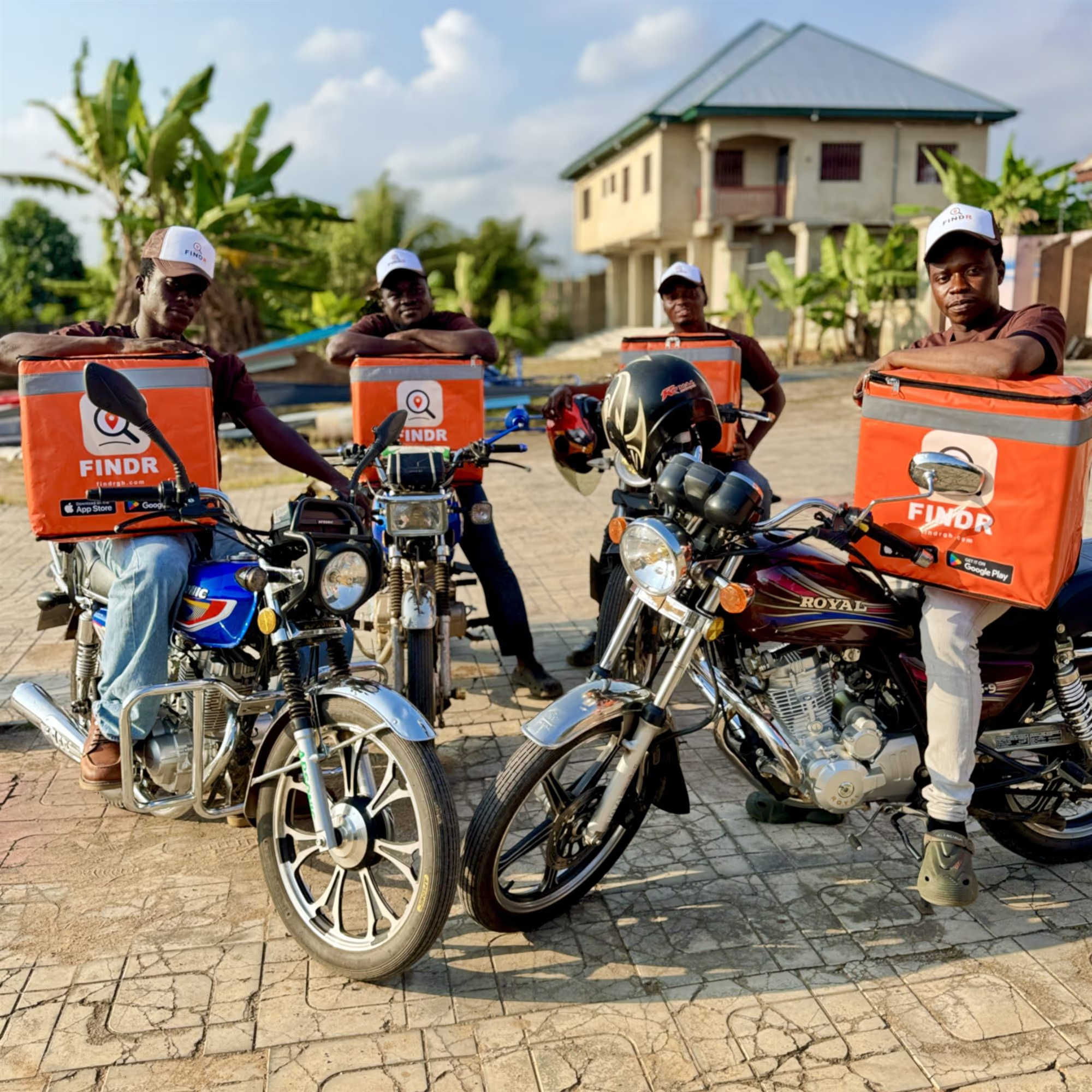
Sell more. Do less setup.
Put your shop where Ghana is already shopping.
List free, and our team builds your whole storefront for you, usually within 24 hours. You just send a picture of your menu or price list.
Free to list · Full POS included free · You keep up to 100% of every sale
Live in three steps
From a picture to a live shop.
You do not type anything into an app. Send us what you have and we do the rest.
Send a picture
WhatsApp a picture of your printed menu, price list or your shelves to FINDR Support on 059 484 1885. A voice note listing items and prices works too.
We build your shop
Our team stocks your full storefront, pictures, prices, opening hours and all, usually within 24 hours, and messages you the moment it is live.
Start selling
Take orders, bookings and dine-in tabs, paid by Mobile Money, card or cash. Review or change anything from the Work tab, anytime. It stays yours.
Your business may already be listed on FINDR. Find it in the app and tap the Claim it card on its listing to make it yours. Already claimed your business? See exactly what to send to get your shop live.
The easy way
Just snap and send. We stock it for you, free.
No forms, no data entry, no waiting on a web dashboard. A picture of your menu or shelves is enough, and FINDR AI turns it into a real storefront with names, descriptions and pictures. You confirm, you go live. See what to send.
WhatsApp FINDR Support
Everything you get
A full business, not just a listing.
List and sell online, run the floor, manage staff and money, and grow, all included from day one.
One POS for either business type. Whether you run a shop or a restaurant, the full POS is included free, with nothing to activate.
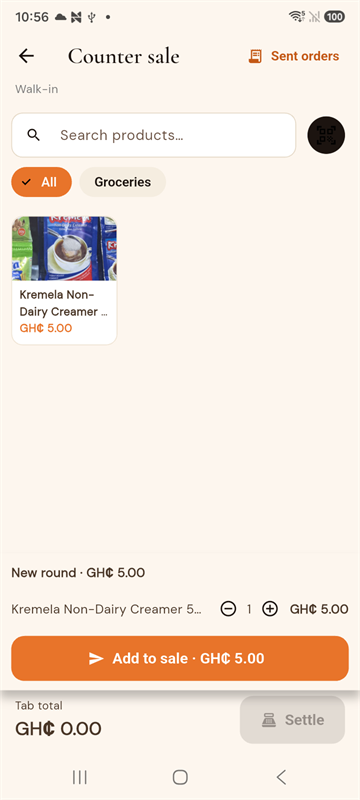
Retail POS for your shop, free
Fast counter sales with quick add or barcode scan, cash-drawer shifts with end-of-day Z-reports, and printed receipts. It keeps selling even when the internet drops.
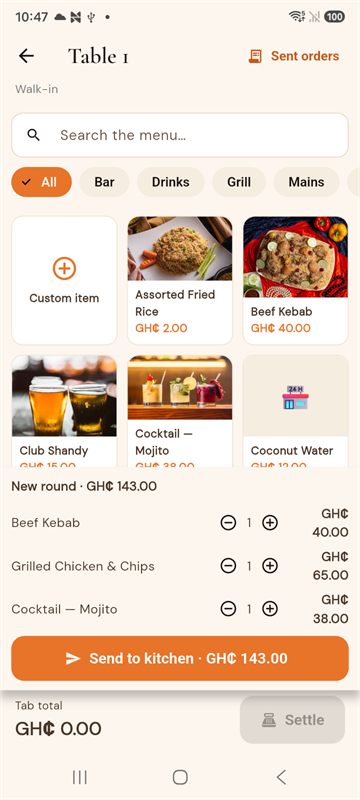
Restaurant POS: order pad & Kitchen Display
Build a round on the order pad and send it straight to a live Kitchen Display, with cash-drawer shifts, Z-reports and receipts. The same POS, set up for a kitchen. It keeps taking orders even when the internet drops. Restaurant intake form.
Dine-in orders & tabs
Guests scan the table QR, order round after round and settle the whole tab at the end. You get a kitchen and waiter view, and a live table map. From the next FINDR app update, turn on table reservations, then confirm or decline each request in the app or at business.findrgh.com.
Delivery or pickup
Sell food and products with delivery by a FINDR rider, or let customers collect it themselves. Pickup is on by default; switch it off if you only deliver.
FINDR AI listing
Snap a product and the listing writes itself. Point your camera at a shelf to count stock.
Real discounts
Shop-wide sales, promo codes, or a voucher to one phone. What you promise is what checkout charges.
Staff roles
Add managers, accountants and cashiers by phone, each limited to their role. Payouts stay with you.
Time clock & payroll
Staff clock in on-site, you approve the hours, and they flow into Ghana payroll.
Theft Guard
Instant alerts on risky voids and POS shortfalls, a daily 5‑item blind stock check, labels you print yourself, and a name on every stock change.
Update your prices from your price list
Upload your Excel or CSV price list and see exactly what will change before it happens. Update prices, add new items, and undo the whole thing if you change your mind. New items can get a picture: FINDR makes an illustration of the kind of item (100 free every month for each shop, plus 300 once as a welcome), or you add your own, which is always free. For retail shops, on the FINDR Business web app. How it works.
Hire a truck with FINDR Haul
Need goods moved? Post a delivery job with the price you will pay, and approved truck, pickup and goods tricycle drivers accept it or bid. Goods tricycles take trips of up to 15 km. Before you pay, you see Haul fee + Payment processing = Total, and FINDR holds the money until the receiver gives the driver the drop-off code. Open the Work tab and tap Hire a truck, or open Hauls at business.findrgh.com. Wholesalers can hire a truck right from a ready "Wholesaler delivers" restock order. Available in: Koforidua, more towns coming. How FINDR Haul works.
Events & tickets
Publish events, sell tickets in-app and boost them to the top of what's on near you.
Ask FINDR Business IQ
A free AI business adviser that reads your real numbers and gives advice that fits your shop, whenever you ask.
Owner dashboard
Orders, bookings and revenue at a glance.
Food cost per plate
Track ingredients and recipes so you price with your margin in view.
Get seen on FINDR
Clearly labelled Sponsored spots that put your products in front of more buyers. Your search ranking is never for sale. See prices.
Get registered
FINDR can handle your business registration with the RGD, fee shown before you pay.
For hotels & guest houses
Run your hotel or guest house on FINDR.
A real front desk in your pocket. Take bookings, run the desk and see your numbers, all from the FINDR Business dashboard.
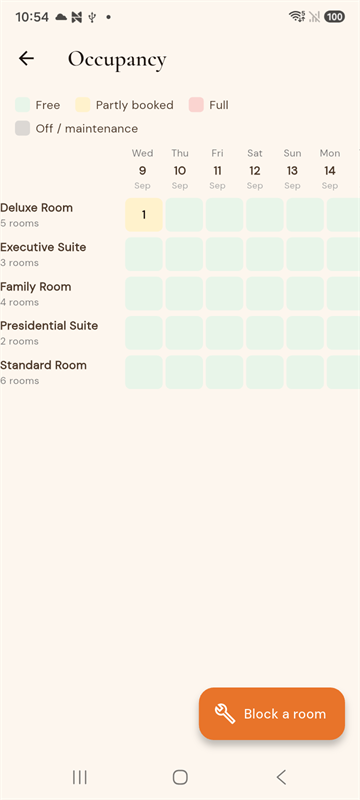
- Live availability and a 14-day occupancy grid, so you never oversell.
- Seasonal, per-date room rates you set yourself.
- Add walk-in and phone reservations straight from the desk.
- Guests order room service and call the front desk from their booking, and calls land in a log you acknowledge.
- Block rooms for maintenance, and stays check out automatically overnight.
- A revenue report showing occupancy, ADR and RevPAR.
- A Flexible, Moderate or Strict cancellation policy guests see before they book.
In your FINDR Business dashboard
Your books and payroll, in one place.
Run the money side from the FINDR Business web dashboard on any computer, at business.findrgh.com. Accounting and payroll are free for every business.
Accounting
Included freeA live profit and loss that pulls your real FINDR sales and takes out refunds, cost of goods and expenses, so you see exactly where the money goes.
- Live profit and loss from your actual sales.
- Log expenses by category and track cost of goods.
- A pragmatic P&L for owners and managers.
Ghana payroll
Included freeSet each staff member's pay, monthly, daily or hourly, with allowances, and FINDR works out SSNIT and PAYE for you, runs payroll and produces printable payslips.
- SSNIT and PAYE worked out for you.
- Approved time-clock hours feed straight in.
- Printable payslips for every staff member.
Manage it all at business.findrgh.com.
Honest pricing
Free to list. You keep the sale.
No monthly fee, no setup fee, no charge for the POS. For most businesses, customers pay FINDR's small service fee at checkout, and you keep your full price. Fuel stations, schools, wholesale suppliers and Makola Fresh market traders are the exceptions.
Cash sales
Cash paid at your shop is all yours. FINDR takes nothing on cash.
Online sales
For most businesses (everything except fuel stations, schools, wholesale suppliers and Makola Fresh market traders), the customer pays a small service fee (about 7%) on top, shown on its own line at checkout. You receive the full price you listed. Some other card and Mobile Money sales (fuel stations, schools, Makola Fresh) still have FINDR's commission and processing fee taken off, and the app shows the exact amount before you are paid.
Listing & POS
Listing, selling online, the full POS (retail and restaurant), and back-office accounting & payroll are all free for every business, with nothing to activate.
Get seen on FINDR
Sponsored spots, clearly labelled.
Want more buyers to see your products? Buy a Sponsored spot yourself in the FINDR app, paid by MoMo or card. Every spot marked "Available now" can be booked today from Get seen in the app. The Stays top banner and the new Food and Makola Fresh spots, marked "Coming soon", open later. When a spot is not sold, FINDR fills it with popular shops and products for free, chosen by sales and ratings, so good pictures and fair prices can get you there too. In the new Food and Makola Fresh spaces, a paid spot says "Sponsored" and a free FINDR pick says "Featured".
Add Reach buyers abroad to a Sponsored product, Spotlight or Hero slide spot and it also shows on findrshop.com, the FINDR web shop, where anyone can shop on a phone or a computer, by Mobile Money or card.
Product boost
Lift one product to the top of your own shop and of Market picks on FINDR Shop, marked Promoted.
Sponsored product
One of your products in the Sponsored products block on Makola Fresh and FINDR Shop.
Spotlight
Four of your products in one block, with a link straight to your shop.
Featured stay
Your hotel or guest house in the Featured stays row on Stays. For hotels and lodging only.
Stays top banner
A big slide at the top of Stays, seen by people looking for a room near you. For hotels and lodging only.
Hero slide
A big slide at the top of Makola Fresh and FINDR Shop, bought yourself in the app.
Food restaurant card
Your restaurant near the top of the Food list. For restaurants and bars only.
Featured dishes
A row of 2 to 4 of your dishes in the Food list. For restaurants and bars only.
Food video
Your video at the top of Food. For restaurants and bars only.
Dish on your menu
One of your dishes moved near the top of your own menu. For restaurants and bars only.
Makola Fresh top row
One item in a row near the top of the market. For the market's own business only.
Makola Fresh More to consider
A row of 2 to 4 items further down the market. For the market's own business only.
Makola Fresh video
Your video in the market. For the market's own business only.
Makola Fresh stall card
Your shop or restaurant as a stall card inside a market. A market can't book itself.
Reach buyers abroad
Also show your ad to buyers abroad who are sending orders to your town. Works with every spot except product boost.
Always labelled. The new spots say "Sponsored", and at most 1 block in every 3 on a screen is sponsored. A boosted product shows "Promoted".
Your ranking is never for sale. Paying does not move you up in search or in nearby lists. Buyers find you there on your own merits.
See what your ads bring. Views, taps and orders from your ads over the last 7 days, right in the app.
Buy it on Android. Spots are bought in the FINDR app on Android, paid by MoMo or card. Boost a product from its menu in your shop: Promote / Boost. The other spots are under More > Get seen on FINDR.
No time for apps?
Let a FINDR agent run it for you.
A trained FINDR agent sets up your storefront and keeps it fresh, adding products, pictures, opening hours and promotions for you, from GH₵50 a month. You approve it in the app, you can end it any time, and everything added stays yours.
Questions
The things owners ask first.
What does it cost to join?
Nothing to list, nothing monthly, and the POS is free. For most businesses (everything except fuel stations, schools, wholesale suppliers and Makola Fresh market traders), customers pay a small service fee (about 7%) at checkout and you receive your full price. Fuel stations, schools, Makola Fresh market traders and a few other sales still have FINDR's commission and processing deducted, and the app shows the exact amount. Cash sales at your shop are 100% yours.
Do I have to type everything in myself?
No. Send a picture of your menu, price list or shelves on WhatsApp and our team builds your full shop for you, usually within 24 hours. You review it and change anything from the Work tab.
Who sets my prices?
You do, and only you can change them. Customers always see your prices exactly as you give them. FINDR never changes your prices.
Can I update all my prices from a spreadsheet?
Yes, it is available now to eligible retail shops on the FINDR Business web app. Upload your Excel or CSV price list and see every change before anything happens. Prices only change when you press Apply, you get a report you can download, and Undo is always there. It is not for restaurants, hotels, schools, fuel stations or market traders. How it works.
Does FINDR make pictures for the new items?
It can. FINDR makes an illustration of the kind of item, for example a fridge or a kettle. It is not a picture of your exact item, and customers see a small note that says so. Every shop that can use the price-list import gets 100 free pictures every month, plus 300 once as a welcome. If you use them up, or you prefer your own, add your own picture to any item. Your own pictures are free and replace FINDR's at any time. How it works.
How do I get paid?
Card and Mobile Money sales settle to your account. You track everything and cash out from your owner dashboard.
I already have a business on FINDR. Where do I sign in?
Head to business.findrgh.com and sign in to manage your orders, bookings, POS, staff and revenue.
Your customers are already on FINDR.
Put your shop in front of them today. Send one picture and be live by tomorrow.